

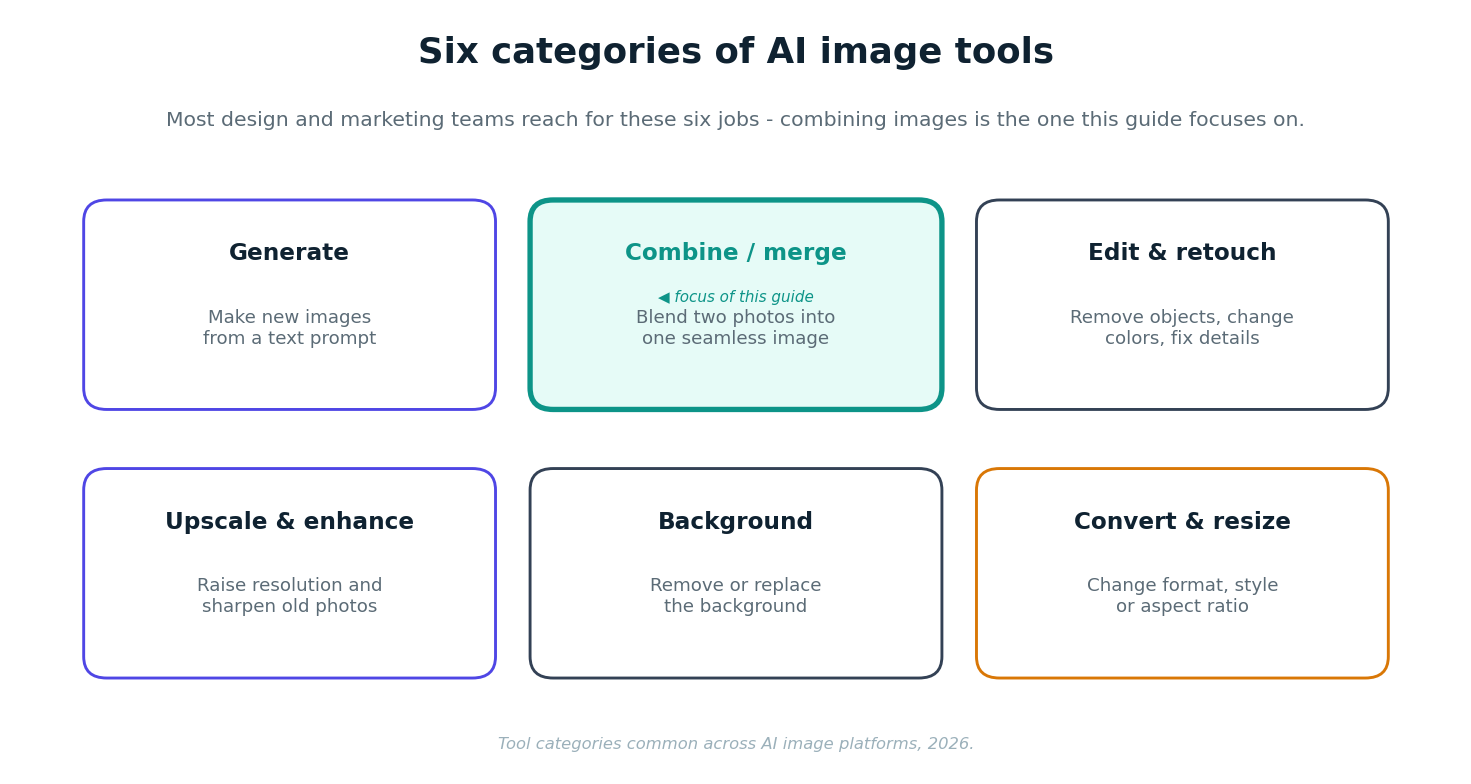
AI image tools are software that create or edit pictures automatically — generating images from text, combining two photos, removing backgrounds, upscaling, and resizing. For design and marketing teams they cut production time from hours to seconds. This guide maps the main categories, then looks closely at one of the most useful for everyday work: the AI image combiner.
The main categories of AI image tools
Almost every AI image feature falls into one of six jobs. Knowing the categories makes it easier to pick the right tool instead of collecting a dozen single-purpose apps.
Spotlight: the AI image combiner
Of the six, the combiner is the one teams underestimate. It solves a problem that used to mean a manual masking job in Photoshop: putting two separate images into one believable picture.
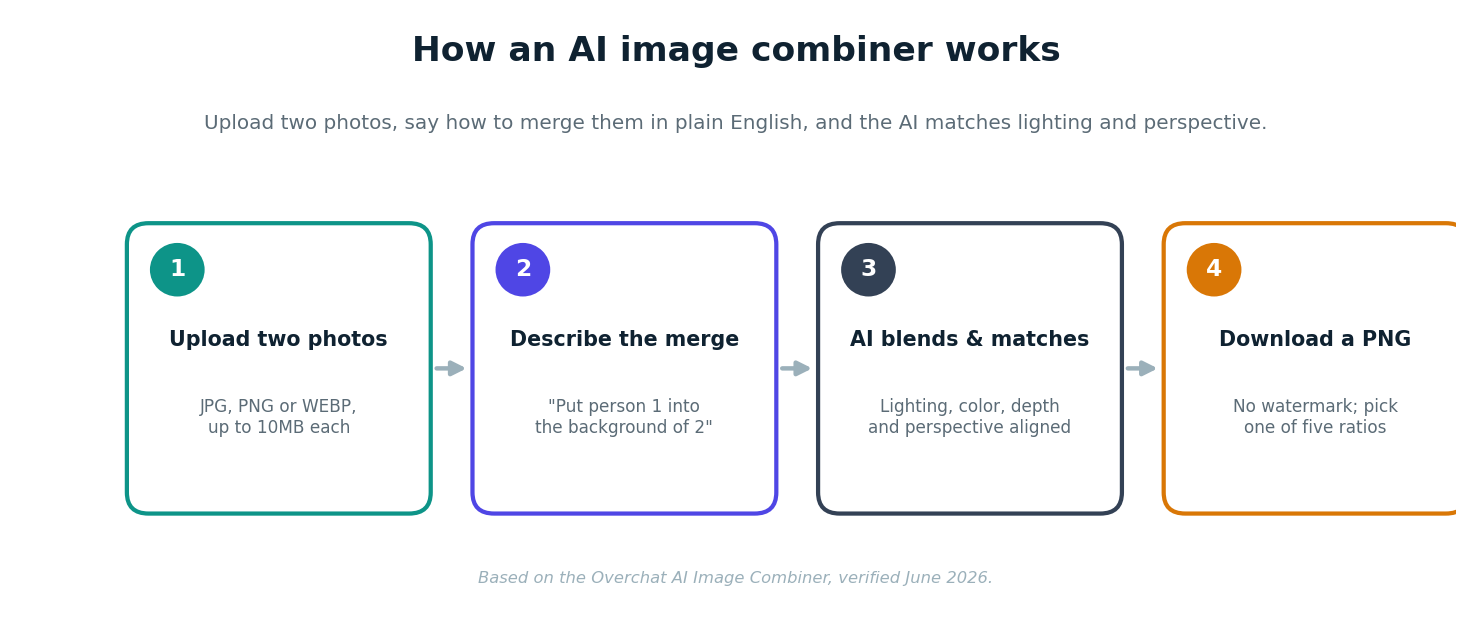
A modern AI image combiner lets you combine images with AI by uploading two photos and describing the result in plain English — for example, "place the person from image 1 into the background of image 2." Instead of crudely pasting, the AI matches lighting, color, depth and perspective and builds a clean mask, so the output reads as a single photo. On Overchat, you can pick from five aspect ratios (Instagram, YouTube, Standard, Portrait and TikTok), and the result downloads as a watermark-free PNG you can use commercially.
Where image combining earns its keep
The business value is concrete. E-commerce teams drop products into styled scenes without a photoshoot. Social and brand teams build group shots from people who were never in the same room, or quick before-and-after comparisons. Designers use it for fast concept composites. Because the merge is driven by a text description, non-designers can get a usable result without learning a layers panel.
Where to do it: notable AI image platforms in 2026
You can find image combining and the other five jobs across several platforms. The trade-off is breadth versus depth — a focused editor versus an all-in-one suite.
For teams that want generation, combining, editing and resizing without juggling subscriptions, an all-in-one platform like Overchat is the pragmatic default; for pixel-perfect retouching, a dedicated editor still wins.
How to choose an AI image tool
Match the tool to the job and the team. If you mostly need one capability — say, background removal for a store — a focused tool is fine. If several people touch images across formats, a broad platform reduces cost and context-switching. Then check three practical things before you commit: whether outputs carry a watermark, whether you can use results commercially, and how the tool handles uploaded images. On the combiner side, Overchat outputs watermark-free PNGs you own and can use commercially, which matters for client and e-commerce work.
It helps to know what sits behind a suite like this. Overchat AI gathers 150+ purpose-built tools for image, video, audio and text generation in one place, running on the latest models from GPT, Claude, Gemini, Grok, Kimi and Qwen. For the text side of that output, teams often add a humanizer AI step, reworking AI-written copy so it reads naturally before it goes into client or marketing work. It works on web, iOS and Android and is used by more than 350,000 people. For a team that would otherwise pay for separate ChatGPT, Claude and Gemini subscriptions, having those models under one login is the practical draw, though for a single job like combining two images you only need the one tool.
FAQ
What are AI image tools?
AI image tools are software that create or edit pictures automatically — generating images from text, combining photos, removing backgrounds, upscaling and resizing — usually in seconds and without manual editing skills.
How do I combine images with AI?
Upload two photos to an AI image combiner, describe how they should merge in plain English, and the AI blends them — matching lighting and perspective — into one seamless image you can download.
Does combining images with AI look realistic?
Good tools match lighting, color, depth and perspective and build a mask, so the result reads as one photo rather than a cut-and-paste. Quality depends on the source images.
Is the Overchat image combiner free?
Overchat's combiner is a paid feature, but you create a free account to start and the platform includes free tools such as an AI image generator.
What file types and sizes can I combine?
On Overchat you can upload JPG, PNG or WEBP up to 10MB each, and the combined image downloads as a PNG.
Can I use AI-combined images commercially?
On Overchat, yes — you own the combined image and can use it for marketing, e-commerce and print. Always check the terms of whichever tool you use.
Sources
AI image combiner features (describe-to-merge, lighting and perspective matching, five aspect ratios, 10MB JPG/PNG/WEBP inputs, PNG output, commercial use) verified on overchat.ai/image/ai-image-combiner, June 2026. Platform capabilities for Adobe Firefly, Canva and Photoroom reflect their generally documented features.
Disclosure: this guide features Overchat AI and links to its image combiner. Comparisons reflect publicly stated capabilities, not paid placement.


