

Creating enough product images for an online clothing store often takes considerable time and resources. Besides standard product photos, sellers usually need lifestyle images, seasonal campaign visuals, and platform-specific creatives for marketplaces and social media.
Pollo AI clothes changer offers a faster way to create these images by placing clothing onto AI models or uploaded avatars from a single garment photo. It can be useful for expanding product catalogs, preparing promotional materials, or producing additional marketing assets without arranging a new photoshoot for every campaign.
This guide explains what Pollo AI Clothes Changer does, when it is most useful, and how to generate clothing promotion images with practical prompts for different e-commerce scenarios.
What Is Pollo AI Clothes Changer?
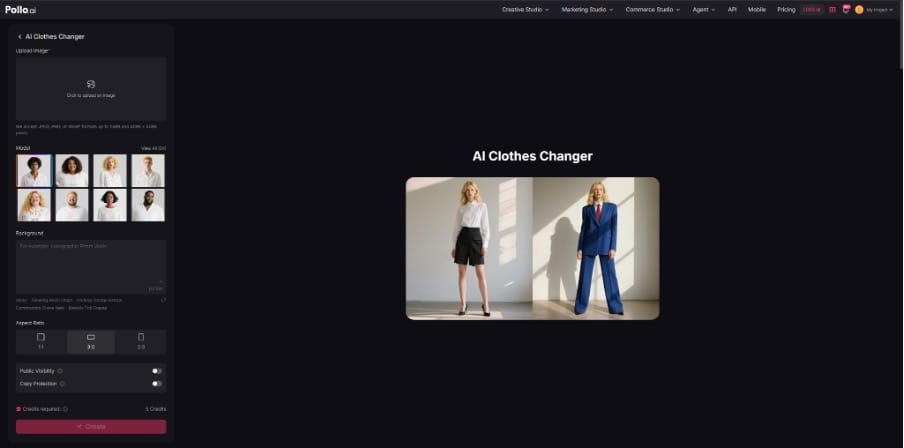
Pollo AI Clothes Changer is an image generation tool designed to help users create clothing photos without photographing every garment on a real model. Users simply upload a photo of a piece of clothing, choose one of the available AI models or upload their own avatar through the Virtual Try-On Photo feature in Commerce Studio, and then describe the look they want with a short text prompt. The tool generates a new image showing the clothing being worn naturally by the selected model.
For e-commerce sellers, this provides a practical way to create different types of product images from a single clothing photo. The same item can be presented on different models, in different settings, or with different visual styles, making it easier to prepare images for product listings, seasonal campaigns, social media posts, or advertising materials without organizing a separate photoshoot for each use case.
While the generated images should still be reviewed before commercial use, especially when small design details are important, the tool can significantly reduce the time needed to produce promotional visuals for a clothing catalog.
What Types of E-commerce Projects Is Pollo AI Clothes Changer Suitable For?
Pollo AI Clothes Changer can fit into different stages of an e-commerce workflow, from creating product listing images to preparing promotional content for social media. The exact way it is used often depends on where the images will be published and who is creating them.
Creating Images for Online Stores and Marketplaces
For online stores and marketplaces such as Amazon, Shopify, Etsy, eBay, and WooCommerce, product images need to present clothing clearly and consistently. Sellers can use Pollo AI Clothes Changer to generate images that highlight the overall appearance of a garment, while also making important details—such as fabric texture, patterns, logos, or stitching—easy to see. This can help prepare listing images more efficiently when managing multiple products.
Producing Content for Social Media Promotions
Different social media platforms often require a more lifestyle-oriented presentation than standard product listings. Images created with Pollo AI Clothes Changer can be adapted for platforms such as Instagram, Facebook, Pinterest, TikTok Shop, and Xiaohongshu by placing the same clothing in outdoor locations, studio settings, or everyday environments. This allows brands to create promotional content that matches the visual style of different campaigns without photographing every scene separately.
Supporting Brands, Designers, and E-commerce Teams
The tool is suitable for a wide range of users, including clothing brands, boutique owners, print-on-demand sellers, freelance designers, marketing agencies, and cross-border e-commerce teams. It can be particularly useful when multiple versions of the same product are needed for different audiences, sales channels, or seasonal campaigns, helping teams expand their image library without repeating the entire photography process.
How to Use Pollo AI Clothes Changer for Different Clothing Promotion Needs?
Using Pollo AI Clothes Changer only takes a few steps, but the quality of the final image depends largely on the clothing photo, model selection, and prompt. Spending a little extra time preparing these elements usually leads to better results.
Step 1. Prepare a Clear Clothing Image
Start by uploading a high-resolution image of the garment. Flat-lay photos, ghost mannequin images, or clothing displayed on a hanger all work well, as long as the entire garment is clearly visible and evenly lit.
If the clothing includes small details such as logos, embroidery, stitching, or printed patterns, make sure they are easy to see in the original photo. During testing, garments with clear source images retained these details much better in the generated results.
Step 2. Select the Most Suitable Model
After uploading the clothing, choose a model from the available library. If the goal is to create quick promotional images or product listings, the built-in models are usually sufficient.
However, one limitation is that the number of available models is relatively small, and users cannot simply describe a specific appearance through text. Brands that need a consistent spokesperson or a particular look may find the default selection restrictive.
A practical solution is to use the Virtual Try-On Photo feature in Commerce Studio, which allows users to upload their own avatar. This makes it possible to generate images with a preferred model while keeping a consistent visual identity across an entire product catalog.
Step 3. Write Short, Clear Prompts
Pollo AI Clothes Changer currently supports prompts of up to about 150 characters, so concise instructions generally work better than long descriptions. Rather than describing every small detail, focus on the scene, lighting, facial expression, and the overall style you want to create.
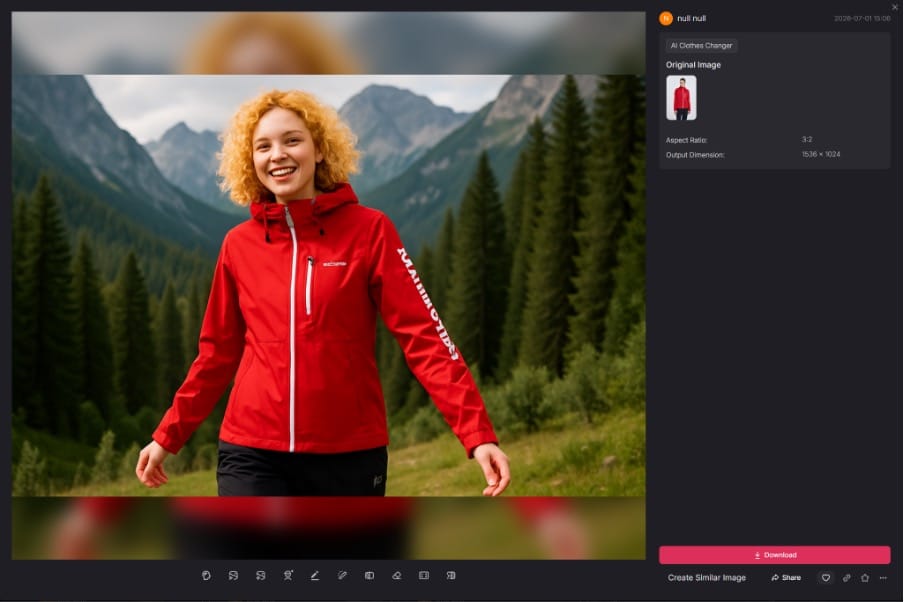
For example, to create a lifestyle image for outdoor apparel, a prompt like the following works well:
Outdoor outfit, set against a mountain forest backdrop, with a happy expression on the character's face, showcasing the clothing's details perfectly.
For a cleaner product image suitable for online stores, a simpler prompt is often enough:
The outdoor outfits, set against a white studio backdrop, showcase the relaxed expressions on the subjects' faces, perfectly highlighting the details of the clothing.
In testing, both prompts produced clear images with clothing that blended naturally onto the selected model. The facial expressions closely followed the instructions, and the fabric, colors, and overall design of the outfit were preserved well enough for typical e-commerce promotional images.
Because of the prompt length limit, users may not be able to describe highly specific camera angles, accessories, or complex environments in a single generation. When more detailed results are needed, it is usually more effective to simplify the prompt, generate the image first, and then create additional variations by changing only one or two elements at a time.
Step 4. Generate Images for Different Platforms
Before generating the final image, choose the aspect ratio that best matches where the content will be published. Pollo AI Clothes Changer currently supports 1:1, 3:2, and 2:3 outputs, which cover most common e-commerce and social media formats.
A square image is suitable for Instagram posts and many marketplace listings, while a vertical format works better for Pinterest or Xiaohongshu. Wider images can be useful for online stores, banners, or promotional landing pages.
The same clothing can also be placed in different environments depending on the campaign. A clean white background is often the better choice for product listings, while outdoor locations, cafés, city streets, or seasonal settings tend to feel more natural for social media promotions.
Step 5. Turn the Images into Promotional Videos
Once the product images are ready, they can be used to create promotional videos with other tools available in Pollo AI.
Different platforms often benefit from different presentation styles. Short clips with natural walking movements or outfit transitions work well for TikTok Shop, while slower camera movement and a cleaner visual style are often better suited to Instagram Reels. For Facebook advertisements, keeping the camera movement simple usually helps maintain attention on the clothing itself instead of the visual effects.
Keeping the motion natural rather than overly dramatic generally produces promotional videos that feel more suitable for e-commerce marketing.
Is Pollo AI Clothes Changer Worth Using?
Pollo AI Clothes Changer is a practical option for clothing brands, online retailers, and e-commerce teams that need to create product images efficiently for catalogs, marketplaces, or social media. It can save time when producing multiple image variations from a single garment.
However, it may not be the right choice for every project. The prompt length is limited, and the built-in model selection may not meet all branding needs, although uploading a custom avatar through Virtual Try-On Photo provides more flexibility.
Overall, it works best as a tool for expanding product image libraries rather than replacing traditional fashion photography. Businesses focused on speed and scale are likely to benefit the most, while premium fashion campaigns may still require professional photoshoots.


